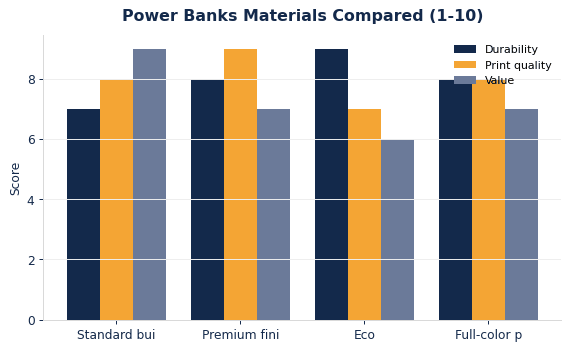
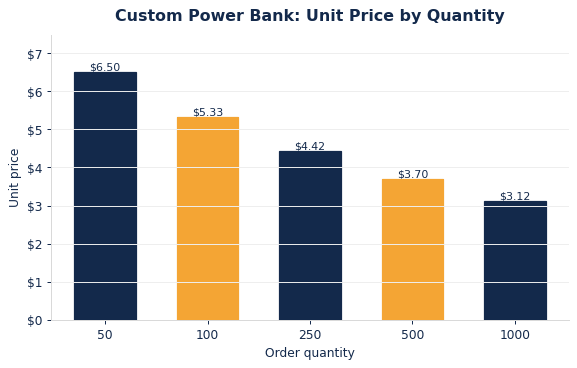
Great artwork for custom power banks is a clean vector logo with solid shapes, high contrast against the casing and a compact version for narrow styles. Customized Power Banks turns your file into a free mockup within 24 hours, and this guide shows how to prepare the logo, place it around ports and lights, and check the proof before approving.
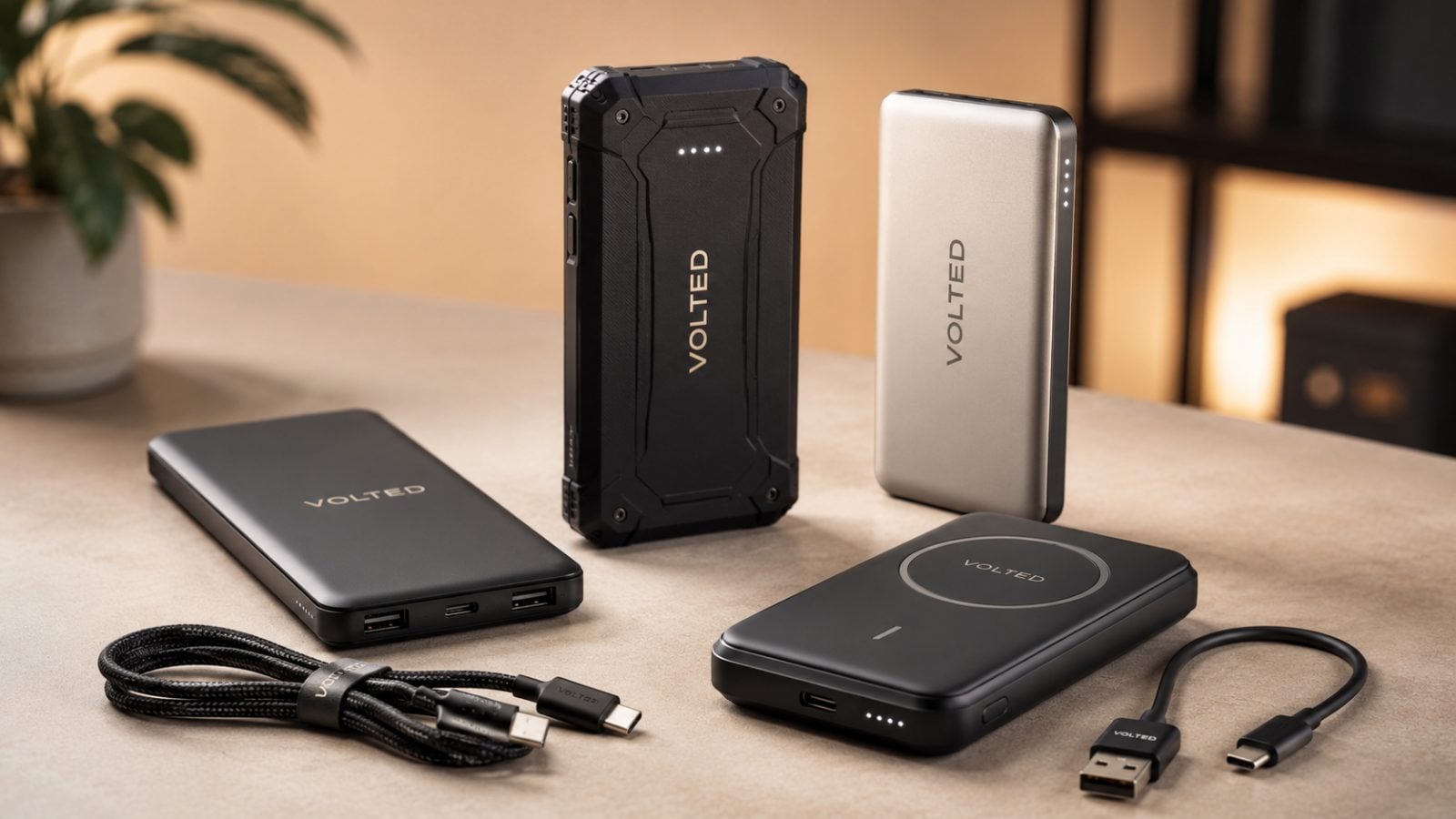
- Vector logos with solid shapes reproduce best on power banks
- Laser engraving shows one tone; UV printing carries full color
- Keep logos clear of ports, buttons and indicator lights
- Free mockup within 24 hours, unlimited free revisions
- Minimum order 12, standard turnaround about 2 weeks
What logo artwork works best on a custom power bank?
The best artwork for custom power banks is a clean vector logo with solid shapes, a limited color count and no fine hairlines. A power bank is a small, curved or slim object, so a logo that reads well on a business card usually reads well here, while a detailed illustration or a wide wordmark with tiny type often needs simplifying first.
Customized Power Banks reviews every file before the mockup, but you save a revision round when you start from the strongest version of your mark. Look for these qualities:
- Vector format such as AI, EPS, SVG or a vector PDF, so edges stay sharp at any size.
- Solid fills rather than soft shadows, glows or textures that blur once scaled down.
- A compact version of the logo, such as a stacked lockup or an icon, for narrow styles.
- Outlined fonts so the type renders exactly as designed.
If all you have is a low-resolution JPG from a website header, send it anyway. The design team can rebuild it, and you still see the result in the free mockup before anything is produced.
How does the decoration method change what your artwork can do?
The decoration method decides how much detail and color your power bank logo can carry. Laser engraving removes surface coating to reveal a single tone, so it reproduces shapes and outlines, not colors. UV printing lays down full color directly on the casing, so it can handle multi-color logos, gradients and brand colors with more freedom.
That difference matters when you choose a style. The 10000mAh power bank is offered with laser engraving, which suits a confident one-color mark. The 5000mAh slim power bank is offered with UV printing, which suits a colorful logo or a full-color graphic.
| Artwork feature | Laser engraving | UV printing |
|---|---|---|
| Multiple brand colors | Reproduced as one tone | Printed in color |
| Gradients and photos | Not suitable | Possible, best kept simple |
| Very thin lines | Can fade into the finish | Can soften at small sizes |
| White or light logo on a dark casing | Engraving shows the base tone | Printed white works well |
| Look and feel | Subtle, premium, permanent | Bold, colorful, eye-catching |
If you are unsure which suits your brand, the earlier comparison of UV print and laser engraving on this blog covers durability; this guide focuses on how to prepare the file itself.
Where does the logo go on each power bank style?
The logo on a custom power bank goes on the largest flat or gently curved face, away from charging ports, buttons and battery indicator lights. Each style in the Customized Power Banks range has a different usable surface, so the same artwork is often adjusted per product rather than copied unchanged.
- Mini capsule power bank: a narrow, rounded body that favors an icon or a short wordmark running along its length.
- Slim and standard power banks: a broad front face that fits a horizontal logo with room to breathe.
- Wireless charging power bank: keep the logo on the face that is not the charging pad, so the mark stays visible while a phone rests on top.
- Rugged outdoor power bank: textured or protective surfaces call for bold, simple shapes.
- Power bank plus cable gift set: the power bank carries the main logo, and the presentation of the set is confirmed on your mockup.
Tell the team which side you want branded and whether you would like a second mark on the back. The mockup shows every placement exactly, so nothing about position is left to guesswork.
How should you handle brand colors and dark casings?
Brand colors on power banks come down to contrast first and color matching second. A navy logo on a black casing disappears in normal light no matter how accurate the ink is, so the first decision is which casing color lets the mark stand out. Customized Power Banks will flag low-contrast combinations on the mockup before you approve.
Practical rules that keep the logo legible:
- Prepare a one-color white version and a one-color dark version of your logo, so the team can use whichever reads best on the casing you pick.
- On dark casings, a white or light print usually outperforms a mid-tone brand color.
- For laser engraving, accept that the logo appears in the tone revealed under the coating, not in your brand color.
- When you need a specific brand color on a UV-printed style, send the color reference with your file so it can be matched on the proof.
A small tagline or website under the logo is welcome, but keep it short. On a pocket-sized charger, the logo does most of the brand work and extra lines of text compete for the same small space.
What are the most common power bank artwork mistakes?
The most common power bank artwork mistakes are type that is too small to read, logos that ignore the casing color, and files that are screenshots instead of real artwork. Each one is easy to fix before the mockup and frustrating to discover after a run ships.
- Shrinking a long wordmark onto a narrow style until the letters blur. Use a stacked or icon version instead.
- Keeping hairline details such as thin outlines, fine registered marks or delicate script that disappear at small sizes.
- Sending a logo with a white box around it, which prints as a visible rectangle on a colored casing.
- Placing the logo where hands or cables cover it, such as next to the ports.
- Adding a QR code that is too small to scan reliably. If you want one, give it its own clear area and test it on the mockup.
- Approving on a phone screen in a hurry without checking spelling, URLs and phone numbers line by line.
None of these require design skills to avoid. They need a quick read-through with the actual product in mind.
What should you include with your artwork request?
Include your logo files, the power bank styles you are considering, the casing colors you prefer and any placement notes when you request a quote. That context lets Customized Power Banks build an accurate first mockup instead of a generic one, which shortens the path to approval.
- Every logo version you have: full lockup, stacked, icon only, one-color white and one-color dark.
- Style shortlist: for example a slim UV-printed model for a colorful logo and a laser-engraved model for an executive gift.
- Casing color preferences and any colors to avoid.
- Placement notes, such as front only or front plus a website on the back.
- Personalization needs, if individual names or teams should appear on certain units.
- Your in-hands date, so the team can confirm standard turnaround or advise on express shipping.
If some of this is undecided, send what you have. The mockup stage exists to settle these choices, and mixing several styles in one order is a common way to compare options side by side.
How do you review a power bank mockup before approving it?
Review a power bank mockup by checking the four things that cannot be changed after production: spelling, placement, color and quantity per style. Customized Power Banks sends a free mockup within 24 hours of your request, revisions are unlimited and free, and you pay nothing until you approve the design, so there is no reason to approve anything you are not sure about.
- Read every word aloud, including taglines, URLs and phone numbers.
- Check placement against the ports, buttons and indicator lights shown on the product.
- Judge contrast at arm’s length, the way a recipient will see the power bank on a desk.
- Confirm the style, casing color and decoration method match what you intended for each part of the order.
- Ask a colleague who did not work on the file to look once more.
After approval, standard turnaround is about 2 weeks, with faster turnaround available through express shipping. The minimum order is 12, so you can test artwork on a smaller first run before a larger rollout. When you are ready, see how it works or request a custom quote with your logo attached.
Frequently asked questions
How should a logo be prepared for laser engraving on a power bank?
For laser engraving on a power bank, prepare a one-color vector logo with solid shapes and no gradients, shadows or photographic detail. The laser reveals a single tone under the casing finish, so color information is ignored and only the outlines matter. Customized Power Banks converts multi-color logos into a clean single-tone version and shows the engraved look on the free mockup before you approve.
Can a gradient or photo be printed on a custom power bank?
A gradient or photo can be printed on a custom power bank when the style uses UV printing, which applies full color directly to the casing. Results are strongest when the image is simple, high-contrast and not too detailed for the small surface. Laser-engraved styles cannot reproduce gradients or photos, so those designs are best matched to a UV-printed model.
Will thin lines and small text show up on a slim power bank?
Thin lines and small text on a slim power bank can soften or fade, because the decorated face is narrow and the logo is scaled down. Bolder strokes and a short wordmark stay crisp. Customized Power Banks flags details that are likely to blur when preparing your mockup, and suggests a simplified or stacked version of the logo if the original needs it.
Should a white logo be used on a dark power bank casing?
A white or light logo is usually the clearest choice on a dark power bank casing, because mid-tone brand colors lose contrast against black or navy. On UV-printed styles the white is printed directly. On laser-engraved styles the logo shows the tone revealed beneath the coating, so the mockup confirms exactly how bright the mark will look.
Can a logo be placed on both sides of a power bank?
A logo can often be placed on both sides of a power bank, such as a main logo on the front and a website or tagline on the back. Availability depends on the style and its surfaces. Customized Power Banks confirms every requested placement on the free mockup, so you see both sides before approving and paying.
Why should a power bank logo stay away from the ports and indicator lights?
A power bank logo placed beside the ports, buttons or indicator lights tends to be covered by cables and fingers, and it can crowd the functional markings that users rely on. Keeping the logo on the clear main face keeps it visible during daily use. The mockup from Customized Power Banks shows the logo position against those features.
Can a QR code be added to a custom power bank?
A QR code can be added to a custom power bank when it has enough clear space and contrast to scan reliably. Small or low-contrast codes on curved or narrow surfaces are the usual failure point. Give the code its own area away from the logo, link it to a stable page, and test it on the mockup before approving.
Does a stacked or horizontal logo work better on a mini capsule power bank?
A mini capsule power bank has a narrow, rounded body, so a compact icon or a short horizontal wordmark running along its length usually reads best. Wide logos with taglines often shrink too far. Send every logo version you have, and Customized Power Banks will choose the one that stays legible and show it on the free mockup.
Can different power bank styles in one order use different logo layouts?
Different power bank styles in one order can use different logo layouts, and they often should. A slim model may carry a horizontal logo while a capsule or rugged model uses a stacked mark or icon. Each layout appears on its own mockup, so you approve every version before production on any style begins.
Is a tagline or website worth adding under the logo on a power bank?
A short tagline or website can be added under the logo on a power bank, but extra text competes for a small surface. One brief line works well on broad faces such as slim or standard models, while narrow styles are better with the logo alone. The mockup shows whether the added line stays readable at actual size.
What should be checked on a power bank mockup before approving?
On a power bank mockup, check spelling, URLs and phone numbers, logo placement against ports and lights, contrast against the casing color, and that the style and decoration method match your plan. Customized Power Banks offers unlimited free revisions and you pay nothing until you approve, so request changes until every detail is right.
Get a free mockup for your power banks
Send your logo or idea and the quantity you have in mind. Customized Power Banks returns a free mockup within 24 hours, you approve the design before anything is produced, and standard turnaround is about two weeks with faster options available. Get a custom quote.