Magnetic wireless power banks — the kind that snap onto the back of an iPhone and charge without a cable — have become one of the most requested promotional electronics of the past two years. They photograph well, they solve a real problem at conferences and trade shows, and they carry a logo on a flat, uninterrupted surface. But “MagSafe-compatible” is a loose phrase, and two units that look identical in a catalog can differ by nearly half in charging speed and holding strength. This walkthrough covers the specifications that actually matter when you place a custom order, so the purchase order you write gets you the product you pictured.
What “MagSafe-compatible” actually promises
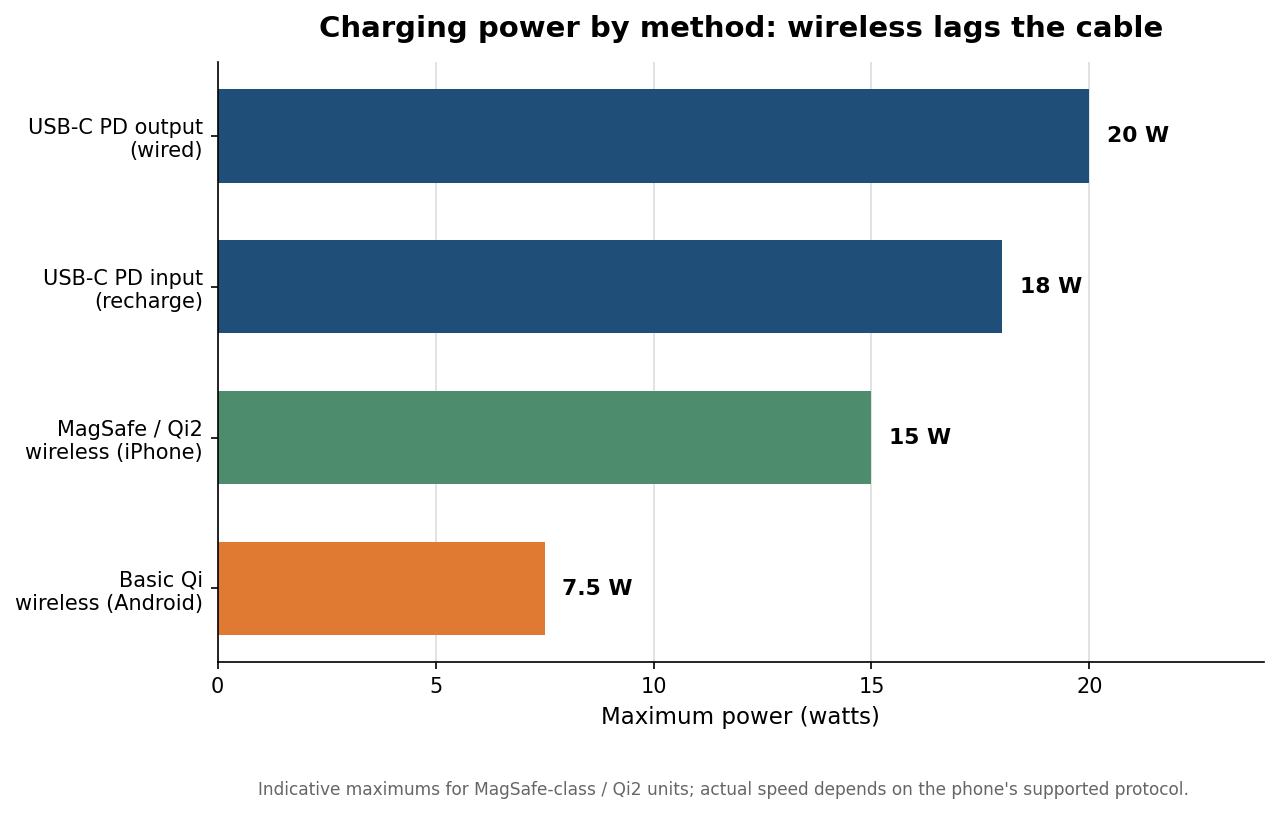
MagSafe is Apple’s magnetic charging standard for the iPhone 12 and later. A true MagSafe-class accessory aligns to the phone with a ring of magnets and charges at up to 15 watts. The open-standard equivalent, Qi2, uses the same magnetic profile and also tops out at 15 watts, which is why most reputable factories now build to Qi2 and market it as MagSafe-compatible. The catch is on the Android side: phones without the magnetic ring fall back to basic Qi wireless, which is capped around 7.5 watts and offers no alignment help. If your audience is mixed-platform, set expectations accordingly — the magnetic snap and the faster speed are an iPhone benefit, while Android users get a slower, unaligned charge or reach for the cable.
One more distinction is worth writing into the spec. Genuine magnetic alignment uses a concentric ring of magnets, not a handful of magnets around the perimeter. Perimeter-only designs let the phone slide sideways, which breaks the charging-coil alignment and quietly drops the wattage partway through a charge. Ask the factory to confirm a concentric ring array rather than assuming the marketing photo tells the truth.
The three numbers that decide performance
Three figures separate a good magnetic power bank from a disappointing one. The first is wireless output. Aim for a genuine 15W rating; units that sustain at least 12W keep an iPhone 14 or 15 charging at a useful pace, while anything advertised at 10W or below is really a basic-Qi part wearing a magnet. The second is magnet strength, measured in grams-force. A holding force around 450 gf keeps the pack attached while the phone rides in a pocket or gets handled; below roughly 350 gf, the unit tends to detach during normal movement, which is exactly when a wireless charger is least useful. The third is capacity, and here honesty matters: a 5,000mAh pack is the popular slim choice, but wireless transfer is meaningfully less efficient than a cable, so the real energy delivered to the phone runs lower than the printed number implies. Treat a wireless capacity claim as a ceiling rather than a guarantee, and if recipients need a full top-up on the go, step up to 10,000mAh or make sure the unit also has a wired path.
On the wired side, specify a USB-C Power Delivery port. A 20W PD output charges a recent iPhone to roughly 50% in about half an hour, and a PD input of 18W or more keeps the pack’s own recharge time reasonable — slow 5V/2A inputs can take five hours or more to refill a 10,000mAh unit, which is a poor experience for anyone who relies on it daily.
Battery, certifications, and whether it can fly
Slim magnetic packs almost always use lithium-polymer pouch cells rather than cylindrical lithium-ion, because the flat format fits a phone-sized footprint and runs cooler. Expect roughly 300 to 500 full charge cycles before capacity settles toward 80% of the original rating, which is reasonable for a giveaway meant to last a year or two of light use. Before you sign off, request three documents by name: the FCC ID, a CE Declaration of Conformity that cites an actual notified-body number, and the UN38.3 transport test report. A “CE” mark with no notified body behind it is a warning sign, and the UN38.3 report is what keeps your shipment legal to move by air and sea.
The airline question comes up constantly, so answer it in your recipient-facing copy. Lithium batteries are rated in watt-hours, and the carry-on limit without special airline approval is 100Wh. A 5,000mAh cell at 3.7 volts works out to about 18.5Wh, and a 10,000mAh cell to about 37Wh — both comfortably under the limit, and both must travel in carry-on baggage rather than checked luggage. For an event giveaway that people will pack for a flight home, that is a genuine selling point, and it costs nothing to state on the insert card.
Sourcing paths, MOQs, and indicative pricing
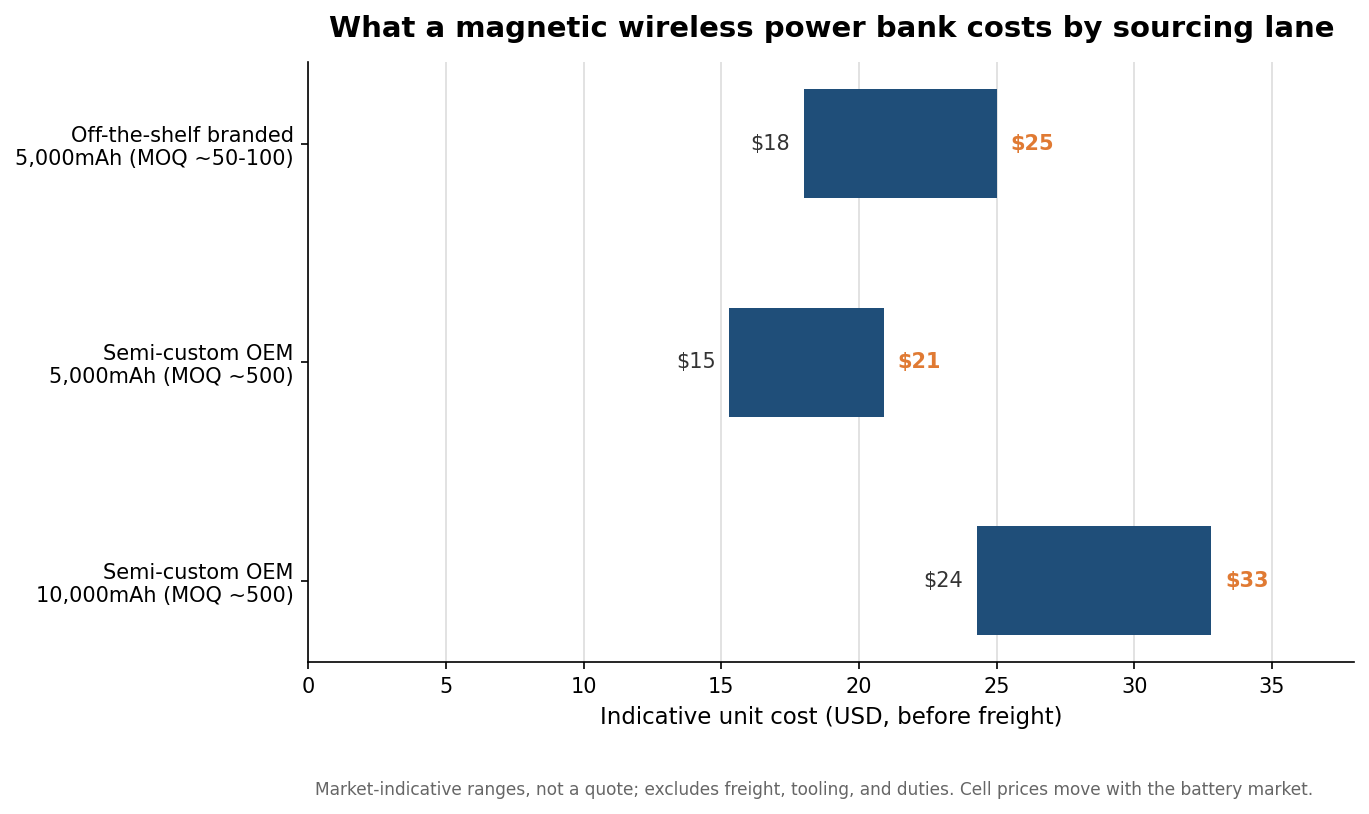
How you buy changes the price and the timeline more than any single spec. The fastest route is an off-the-shelf branded unit, where a factory prints your logo on an existing model. Minimums can run as low as 50 to 100 pieces and delivery lands in roughly two to four weeks. Indicative unit cost for a solid 5,000mAh magnetic pack in this lane sits in the high-teens to mid-twenties per piece before freight — and offers under about $12 deserve suspicion, since that price usually signals skipped safety verification or recycled cells. Stepping up to a semi-custom order, where you change the housing color or packaging, typically starts near a 500-piece minimum, adds a tooling charge, and pushes lead time to eight to twelve weeks. Full custom design from scratch is a several-thousand-unit, multi-month commitment that rarely makes sense for a promotional run. The numbers here are market-indicative rather than a quote; battery costs move with the commodity market, so confirm live pricing before you lock a budget.
Specifying the imprint without hurting the unit
The magnetic face is a clean canvas, but a few placement rules protect both the look and the hardware. Keep the logo away from any venting slots, because ink laid over a vent peels early and can trap heat. On a matte housing, UV printing holds fine color and photographs well, while laser engraving leaves a permanent mark that never wears — a worthwhile trade when longevity matters more than color. Avoid ultra-thin housings under about 4mm unless slimness is the entire point, since the thinnest packs sacrifice cell longevity and shed heat poorly. Finally, write an inspection clause into the order. The most common real-world complaints are units that run warm after twenty minutes and logos that shift on a small share of pieces, and both are catchable at a pre-shipment inspection when you reserve the right to one.
Leave a Reply